Propertyhub
propertyhub logo
Reviewāļ„āļđāđˆāļĄāļ·āļ­/āļ‹āļ·āđ‰āļ­/āļ‚āļēāļĒ/āđ€āļŠāđˆāļēHome & LivingNewsāļ™āļēāļĒāļŦāļ™āđ‰āļēāļĄāļ·āļ­āđ‚āļ›āļĢ
āļ„āđ‰āļ™āļŦāļēāļšāļ—āļ„āļ§āļēāļĄclock

How to set up an Automated Listing Refresh | propertyhub.in.th

āļĨāļ‡āļ—āļļāļ™āļ­āļŠāļąāļ‡āļŦāļēāļŊāļ„āļđāđˆāļĄāļ·āļ­āļāļēāļĢāđƒāļŠāđ‰āļ‡āļēāļ™āđ€āļ§āđ‡āļšāđ„āļ‹āļ•āđŒ
BY
Khao
āđ‚āļžāļŠāļ•āđŒāđ€āļĄāļ·āđˆāļ­
29 October 2025

Automated Listing Refresh is a feature that helps you automatically move your listings back to the top position by scheduling specific dates and times in advance. This saves you time from manually refreshing each listing, especially when you have a large number of them.


In this article, we’ll clearly explain how to use the Automated Listing Refresh feature and guide you through the simplest steps possible. Let’s get started!


For who prefer to use Automated Listing Refresh, you should have these 2 package first.

  1. Subscription Package
  2. Top Up Package

If you don’t have the two packages mentioned above yet, you might not be able to use this feature. If you’re interested, you can check out some basic information in this article first. Or, if you’d like to give it a try, you can start with the smallest Top Up package , starting from just 500 THB.


Step for using “Automated Listing Refresh”

  1. Go to “Dashboard” in Automated Listing Refresh menu
  2. Click “Create” button to start a campaign
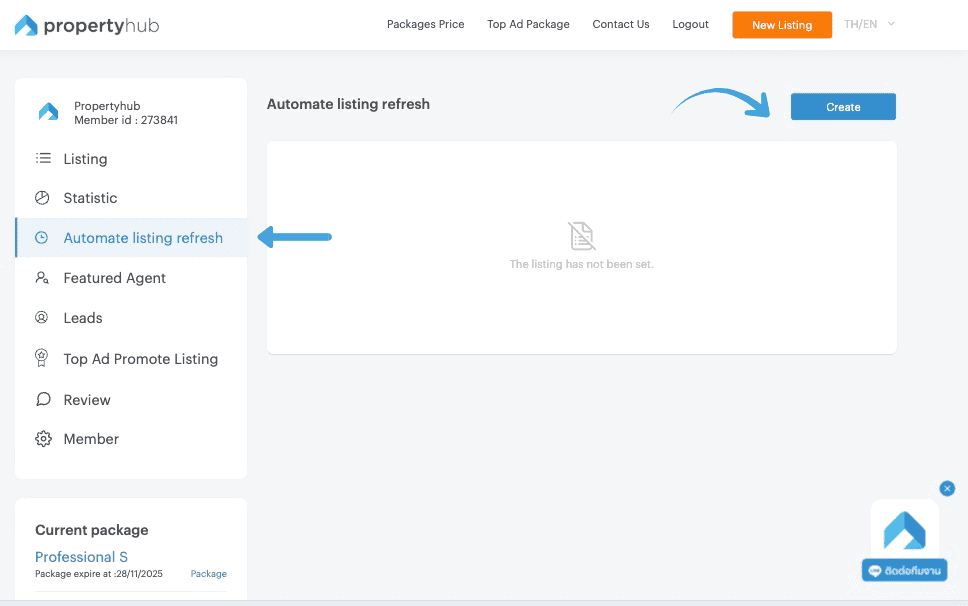
 

Step 1 for automate listing refresh


3. After clicking the “Create” button, a campaign scheduling window will appear in the center of your screen. You can begin by naming your campaign as desired.


4. Next, select the listings to include in the scheduled. At this stage, you can choose between two options :

  • All Listings – The system will automatically include all of your currently online listings in the scheduling process.
    If you select this option, you may skip the condition-setting steps and proceed directly to the section on specifying the date and time


  • Listings with Condition – The system will filter listings based on the conditions you define.
    Once you choose this option, additional sections for selecting condition types and adding specific conditions will appear for you to configure.


Step 3 & 4 for automate listing refresh


5. If you select “Listings with Condition” in this part is allow you to choose a condition that you desire to manage it by selecting in 3 conditions 

  • Match Any : The system will select listings that meet any of the conditions you define in Step 6.
  • Match All : The system will select listings that meet all of the conditions you define in Step 6.
  • Match None : The system will select listings that do not meet any of the conditions you define in Step 6


6. Add the conditions for the listings you want to include. After selecting the condition type, you can proceed to define them. There are three ways to add conditions as follows:

  • Tag - Select from the tags you have previously assigned to your listings. (Guide to Creating Tags)
  • Listing Details - Define conditions based on your listing details, such as project name, property type, or listing type.
  • Listing ID - Specify the exact listing IDs you want to include in the campaign. You can find the listing IDs on your Listings menu. (You can enter multiple IDs by separating them with a single space.)


For Instance : 

Assume I select in “Match All” Condition , so the system will select a listings with include in my adding from Tags Condition (Phayathai and XT Phayathai). Therefore, the listings that include in both Phayathai and XT Phayathai tags will be automatically refreshed.


step 5 & 6 for automate listings refresh


7. This step is quite simple — you can choose whether to schedule by specific dates in the month or by days of the week. You can also select multiple days and multiple time as shown below.

Selecting specific dates in the month : 

In this example, you schedule boosts on the 2th, 7th, and 10th of the month. For each of those dates, you set three time slots: 8:00 AM, 10:00 AM,   and 1:00 PM. This means your listings will be automatically refreshed 3 days per month, with 3 times per day.


Step 7 for automated Listings Refresh


Selecting specific days of the week : 

In this example, you select Tuesday and Friday by set three time slots: 8:00 AM, 10:00 AM, and 1:00 PM. This means your listings will be automatically refreshed 2 days per weeks, with 3 times per day.


Step 7 for automated Listings Refresh [2]


8. Check your accurate details before Click “ Done” Button

Step 8 for automated listings refresh


PS. If you need to manage the campaign after it has started running, go to the “Action” column.

You’ll see two buttons — the left button is for On/Pause, while the right button shows a three-dot menu that includes the following options: Refreshed History, Edit campaign and Remove.


Manage Listings on propertyhub


All of this guide how to use an Automated Listings Refresh on propertyhub.in.th. We hope this article will help you more clearly understand stage to use this function for managing your listings. However, if you have any question you can directly contact our team via Line : @propertyhub or Tel : 02-026-3049


User Guide Propertyhub.in.th


User guide for propertyhub.png

āđāļŠāļĢāđŒāđ€āļ™āļ·āđ‰āļ­āļŦāļē
Khao
āļŠāđˆāļ­āļ‡āļ—āļēāļ‡āđƒāļ™āļāļēāļĢāļ•āļīāļ”āļ•āļēāļĄ
LINE@ Add Friend
āļšāļ—āļ„āļ§āļēāļĄāļ—āļĩāđˆāđ€āļāļĩāđˆāļĒāļ§āļ‚āđ‰āļ­āļ‡

āļ­āļąāļ›āđ€āļ”āļ•! āļāļŽāļŦāļĄāļēāļĒāļ„āļ§āļšāļ„āļļāļĄāļŠāļąāļāļāļēāđ€āļŠāđˆāļēāļ‰āļšāļąāļšāļ›āļĩ 2568

āļĨāđˆāļēāļŠāļļāļ”! āļŠāļģāļ™āļąāļāļ‡āļēāļ™āļ„āļ“āļ°āļāļĢāļĢāļĄāļāļēāļĢāļ„āļļāđ‰āļĄāļ„āļĢāļ­āļ‡āļœāļđāđ‰āļšāļĢāļīāđ‚āļ āļ„ (āļŠāļ„āļš.) āļ­āļ­āļ"āļ›āļĢāļ°āļāļēāļĻāļ„āļ“āļ°āļāļĢāļĢāļĄāļāļēāļĢāļ§āđˆāļēāļ”āđ‰āļ§āļĒāļŠāļąāļāļāļē āđ€āļĢāļ·āđˆāļ­āļ‡ āđƒāļŦāđ‰āļ˜āļļāļĢāļāļīāļˆāļāļēāļĢāđƒāļŦāđ‰āđ€āļŠāđˆāļēāļ­āļēāļ„āļēāļĢāđ€āļžāļ·āđˆāļ­āļ­āļĒāļđāđˆāļ­āļēāļĻāļąāļĒāđ€āļ›āđ‡āļ™āļ˜āļļāļĢāļāļīāļˆāļ—āļĩāđˆāļ„āļ§āļšāļ„āļļāļĄāļŠāļąāļāļāļē āļž.āļĻ.2568"  āđ€āļžāļīāđˆāļĄāđ€āļ•āļīāļĄāļĄāļēāļˆāļēāļāļ›āļĢāļ°āļāļēāļĻāļ‰āļšāļąāļšāļ›āļĩ 2562 āļ‹āļķāđˆāļ‡āđƒāļ™āļšāļ—āļ„āļ§āļēāļĄāļ™āļĩāđ‰āđ€āļĢāļēāļˆāļ°āļžāļēāđ„āļ›āļ”āļđāļ§āđˆāļēāļĄāļĩāļāļŽāļŦāļĄāļēāļĒāļŠāđˆāļ§āļ™āđ„āļŦāļ™āļ­āļąāļ›āđ€āļ”āļ•āļĄāļēāļšāđ‰āļēāļ‡ āļ–āđ‰āļēāļžāļĢāđ‰āļ­āļĄāđāļĨāđ‰āļ§āđ„āļ›āļ”āļđāļāļąāļ™āđ€āļĨāļĒ!

āđ‚āļžāļŠāļ•āđŒāđ€āļĄāļ·āđˆāļ­28 November 2025

āļĢāļ§āļĄāđāļšāļĢāļ™āļ”āđŒāļ„āļ­āļ™āđ‚āļ”āļˆāļēāļ â€œāļžāļĪāļāļĐāļē” (Pruksa)

āļœāļđāđ‰āļžāļąāļ’āļ™āļēāļ­āļŠāļąāļ‡āļŦāļēāļĢāļīāļĄāļ—āļĢāļąāļžāļĒāđŒāđƒāļ™āļ•āļĨāļēāļ”āđ€āļĄāļ·āļ­āļ‡āđ„āļ—āļĒāļ­āļĒāđˆāļēāļ‡ â€˜Pruksa’ āļ—āļĩāđˆāļ„āļīāļ”āļ§āđˆāļēāļŦāļĨāļēāļĒ āđ† āļ„āļ™āļ„āļ‡āđ€āļ„āļĒāđ„āļ”āđ‰āļĒāļīāļ™ āļ‹āļķāđˆāļ‡āđ€āļ›āđ‡āļ™āļŦāļ™āļķāđˆāļ‡āđƒāļ™āļœāļđāđ‰āļžāļąāļ’āļ™āļēāļ—āļĩāđˆāļĄāļĩāđ‚āļ„āļĢāļ‡āļāļēāļĢāđƒāļāļĨāđ‰āļĢāļ–āđ„āļŸāļŸāđ‰āļē āļ—āļĩāđˆāļĄāļĩāļŠāļĢāđ‰āļēāļ‡āđƒāļŦāđ‰āļĄāļĩāļ„āļ§āļēāļĄāļŦāļĨāļēāļāļŦāļĨāļēāļĒāļŠāđ„āļ•āļĨāđŒ āđāļĨāļ°āđ‚āļ”āđ€āļ”āđˆāļ™āđƒāļ™āļ—āļļāļ āđ† āđ‚āļ„āļĢāļ‡āļāļēāļĢ āļ•āļ­āļšāđ‚āļˆāļ—āļĒāđŒāđ„āļĨāļŸāđŒāļŠāđ„āļ•āļĨāđŒāļ„āļ™āļ—āļļāļāļĒāļļāļ„āļ—āļļāļāļŠāļĄāļąāļĒāļ‹āļķāđˆāļ‡āđƒāļ„āļĢāļ—āļĩāđˆāļŠāļ™āđƒāļˆāļˆāļ°āđ€āļŠāđˆāļēāļŦāļĢāļ·āļ­āļ‹āļ·āđ‰āļ­āļ„āļ­āļ™āđ‚āļ” āđƒāļ™āļ—āļģāđ€āļĨāļ—āļĩāđˆāļ”āļĩāđāļĨāļ°āļĢāļēāļ„āļēāļ—āļĩāđˆāđ€āļ‚āđ‰āļēāļ–āļķāļ‡āđ„āļ”āđ‰ āļ•āđ‰āļ­āļ‡āļ­āđˆāļēāļ™āļšāļ—āļ„āļ§āļēāļĄāļ™āļĩāđ‰ āđ€āļžāļĢāļēāļ°āđ€āļĢāļēāļˆāļ°āļžāļēāđ„āļ›āļĢāļđāđ‰āļˆāļąāļāļāļąāļšāđāļšāļĢāļ™āļ”āđŒāļ„āļ­āļ™āđ‚āļ”āļ•āđˆāļēāļ‡āđ† āļ‚āļ­āļ‡ Pruksa āļ§āđˆāļēāđāļ•āđˆāļĨāļ°āđāļšāļĢāļ™āļ”āđŒāļĄāļĩāļˆāļļāļ”āđ€āļ”āđˆāļ™āļ­āļ°āđ„āļĢāļšāđ‰āļēāļ‡

āđ‚āļžāļŠāļ•āđŒāđ€āļĄāļ·āđˆāļ­21 November 2025

Featured Agent : The New Opportunity Professional Agents Shouldn’t Miss!

Featured Agent is a new position on propertyhub.in.th that promote your profile in every pages that match your chosen projects and also enhance seekers to see you more in everywhere. Our team has developed this special position to increase business opportunities for agents. So, what exactly is this project-agent position, and how does it work? Let’s begin exploring in this article.

āđ‚āļžāļŠāļ•āđŒāđ€āļĄāļ·āđˆāļ­05 November 2025

How to Create “Tags” for Your Listing | propertyhub.in.th

Creating Tags is a technique used to group multiple listings together, allowing you to manage, refresh, activate, deactivate, and perform other actions on several listings simultaneously. This method helps you work more efficiently and can be used completely free of charge, with no additional fees or service costs. This article will guide you how to create and manage tags for your listings . Let's begin!

āđ‚āļžāļŠāļ•āđŒāđ€āļĄāļ·āđˆāļ­30 October 2025

āļšāļ—āļ„āļ§āļēāļĄāđāļ™āļ°āļ™āļģ

āļĢāļ§āļĄāļ‚āļąāđ‰āļ™āļ•āļ­āļ™āļāļēāļĢāļĢāļąāļšāđ‚āļ­āļ™āļ„āļ­āļ™āđ‚āļ” āļžāļĢāđ‰āļ­āļĄāđ€āļ­āļāļŠāļēāļĢāļāļēāļĢāđ‚āļ­āļ™āļ—āļĩāđˆāļ•āđ‰āļ­āļ‡āļˆāļąāļ”āđ€āļ•āļĢāļĩāļĒāļĄ

āļĢāļ§āļĄāļ‚āļąāđ‰āļ™āļ•āļ­āļ™āļāļēāļĢāļĢāļąāļšāđ‚āļ­āļ™āļ„āļ­āļ™āđ‚āļ” āļžāļĢāđ‰āļ­āļĄāđ€āļ­āļāļŠāļēāļĢāļāļēāļĢāđ‚āļ­āļ™āļ—āļĩāđˆāļ•āđ‰āļ­āļ‡āļˆāļąāļ”āđ€āļ•āļĢāļĩāļĒāļĄ

āđƒāļ™āļāļēāļĢāļ‹āļ·āđ‰āļ­āļ­āļŠāļąāļ‡āļŦāļēāļĢāļīāļĄāļ—āļĢāļąāļžāļĒāđŒāļ­āļĒāđˆāļēāļ‡āļ„āļ­āļ™āđ‚āļ”āļ™āļąāđ‰āļ™ āļ™āļ­āļāđ€āļŦāļ™āļ·āļ­āļˆāļēāļāļĢāļēāļ„āļēāļ‚āļēāļĒāļ„āļ­āļ™āđ‚āļ”āđāļĨāđ‰āļ§ āļŠāļīāđˆāļ‡āļ—āļĩāđˆāļ•āđ‰āļ­āļ‡āļ—āļĢāļēāļšāļ™āļ­āļāđ€āļŦāļ™āļ·āļ­āļˆāļēāļāļ™āļĩāđ‰āļāđ‡āļ„āļ·āļ­āđ€āļĢāļ·āđˆāļ­āļ‡āļ‚āļ­āļ‡ āļ‚āļąāđ‰āļ™āļ•āļ­āļ™āļ•āđˆāļēāļ‡āđ† āļ—āļĩāđˆāļœāļđāđ‰āļ‹āļ·āđ‰āļ­āļ—āļļāļāļĢāļēāļĒāļˆāļ°āļ•āđ‰āļ­āļ‡āļ—āļģāļ„āļ§āļēāļĄāđ€āļ‚āđ‰āļēāđƒāļˆ āđ€āļžāļĢāļēāļ°āđ„āļĄāđˆāļ§āđˆāļēāļˆāļ°āđ€āļ›āđ‡āļ™āļāļēāļĢ āļ‹āļ·āđ‰āļ­āļ„āļ­āļ™āđ‚āļ” āļĄāļ·āļ­āļŦāļ™āļķāđˆāļ‡āļˆāļēāļāļœāļđāđ‰āļžāļąāļ’āļ™āļēāđ‚āļ„āļĢāļ‡āļāļēāļĢ āļŦāļĢāļ·āļ­āļāļēāļĢāļ‹āļ·āđ‰āļ­āļ„āļ­āļ™āđ‚āļ”āļĄāļ·āļ­āļŠāļ­āļ‡āļ•āđˆāļ­āļˆāļēāļāļœāļđāđ‰āđ€āļ›āđ‡āļ™āđ€āļˆāđ‰āļēāļ‚āļ­āļ‡āļāđ‡āļ•āļēāļĄ āļ‚āļąāđ‰āļ™āļ•āļ­āļ™āļ‚āļ­āļ‡āļāļēāļĢ āđ‚āļ­āļ™āļ„āļ­āļ™āđ‚āļ” āļ„āļ·āļ­āđ€āļĢāļ·āđˆāļ­āļ‡āļ—āļĩāđˆāļˆāļ°āļŠāļĢāđ‰āļēāļ‡āļ„āļ§āļēāļĄāļ›āļ§āļ”āļŦāļąāļ§āđ„āļĄāđˆāļ™āđ‰āļ­āļĒāļŠāļģāļŦāļĢāļąāļšāđƒāļ„āļĢāļ—āļĩāđˆāđ„āļĄāđˆāđ€āļ„āļĒāļ—āļģāļ„āļ§āļēāļĄāđ€āļ‚āđ‰āļēāđƒāļˆāļĄāļēāļāđˆāļ­āļ™

āđ‚āļžāļŠāļ•āđŒāđ€āļĄāļ·āđˆāļ­29 August 2025
āļ§āļīāļ˜āļĩāđ€āļŠāđ‡āļ„āđāļ™āļ§āđ€āļ§āļ™āļ„āļ·āļ™āļ—āļĩāđˆāļ”āļīāļ™(āđ€āļšāļ·āđ‰āļ­āļ‡āļ•āđ‰āļ™) āļāđˆāļ­āļ™āļ•āļąāļ”āļŠāļīāļ™āđƒāļˆāļ‹āļ·āđ‰āļ­āļ­āļŠāļąāļ‡āļŦāļēāļŊ

āļ§āļīāļ˜āļĩāđ€āļŠāđ‡āļ„āđāļ™āļ§āđ€āļ§āļ™āļ„āļ·āļ™āļ—āļĩāđˆāļ”āļīāļ™(āđ€āļšāļ·āđ‰āļ­āļ‡āļ•āđ‰āļ™) āļāđˆāļ­āļ™āļ•āļąāļ”āļŠāļīāļ™āđƒāļˆāļ‹āļ·āđ‰āļ­āļ­āļŠāļąāļ‡āļŦāļēāļŊ

āļ—āļēāļ‡āļ—āļĩāļĄāļ‡āļēāļ™ Propertyhub āļˆāļ°āļ‚āļ­āļžāļēāļ„āļļāļ“āđ„āļ›āļĢāļđāđ‰āļˆāļąāļāļāļąāļšāļ§āļīāļ˜āļĩāđ€āļŠāđ‡āļ„āđāļ™āļ§āđ€āļ§āļ™āļ„āļ·āļ™āļ—āļĩāđˆāļ”āļīāļ™(āđ€āļšāļ·āđ‰āļ­āļ‡āļ•āđ‰āļ™)āļāđˆāļ­āļ™āļ•āļąāļ”āļŠāļīāļ™āđƒāļˆāļ‹āļ·āđ‰āļ­āļ­āļŠāļąāļ‡āļŦāļēāļŊ āļ—āļąāđ‰āļ‡āļ™āļĩāđ‰āļāđ‡āđ€āļžāļ·āđˆāļ­āļ›āđ‰āļ­āļ‡āļāļąāļ™āļ›āļąāļāļŦāļēāļāļēāļĢāđ€āļ§āļ™āļ„āļ·āļ™āļ—āļĩāđˆāļ”āļīāļ™ āļ—āļĩāđˆāļ‚āļ­āļšāļ­āļāđ„āļ”āđ‰āđ€āļĨāļĒāļ§āđˆāļēāđ„āļĄāđˆāļĄāļĩāđƒāļ„āļĢāļ­āļĒāļēāļāļˆāļ°āđ€āļˆāļ­

āđ‚āļžāļŠāļ•āđŒāđ€āļĄāļ·āđˆāļ­08 September 2023
āļĢāļēāļ„āļēāļ›āļĢāļ°āđ€āļĄāļīāļ™āļ—āļĩāđˆāļ”āļīāļ™ 77 āļˆāļąāļ‡āļŦāļ§āļąāļ” āļ›āļĩ 2568 āļāļĢāļĄāļ˜āļ™āļēāļĢāļąāļāļĐāđŒ

āļĢāļēāļ„āļēāļ›āļĢāļ°āđ€āļĄāļīāļ™āļ—āļĩāđˆāļ”āļīāļ™ 77 āļˆāļąāļ‡āļŦāļ§āļąāļ” āļ›āļĩ 2568 āļāļĢāļĄāļ˜āļ™āļēāļĢāļąāļāļĐāđŒ

āđ€āļŠāđ‡āļāļĢāļēāļ„āļēāļ›āļĢāļ°āđ€āļĄāļīāļ™āļ—āļĩāđˆāļ”āļīāļ™āļĨāđˆāļēāļŠāļļāļ”āļ›āļĩ 2568 āļ„āļĢāļšāļ—āļąāđ‰āļ‡ 77 āļˆāļąāļ‡āļŦāļ§āļąāļ” āđƒāļŠāđ‰āļ›āļĢāļ°āļāļ­āļšāļāļēāļĢāļ‹āļ·āđ‰āļ­āļ‚āļēāļĒ āļŦāļĢāļ·āļ­āļ§āļēāļ‡āđāļœāļ™āļĨāļ‡āļ—āļļāļ™āļ­āļŠāļąāļ‡āļŦāļēāđ„āļ”āđ‰āđāļĄāđˆāļ™āļĒāļģāļĒāļīāđˆāļ‡āļ‚āļķāđ‰āļ™

āđ‚āļžāļŠāļ•āđŒāđ€āļĄāļ·āđˆāļ­10 February 2025

āļ„āļ­āļ™āđ‚āļ”āđƒāļŦāđ‰āđ€āļŠāđˆāļēāļĒāļ­āļ”āļ™āļīāļĒāļĄ

propertyhub logo

āđ€āļĄāļ™āļđāļŦāļĨāļąāļ

āļ•āļīāļ”āļ•āđˆāļ­āđ€āļĢāļē

āļšāļĢāļīāļĐāļąāļ— āļ‹āļīāļĄāđ€āļ›āļīāđ‰āļĨ āļ­āļīāļ™āđ€āļ—āļ­āļĢāđŒāđ€āļ™āđ‡āļ•
āļˆāđāļēāļāļąāļ” āđ€āļĨāļ‚āļ—āļĩāđˆ 242 āļŦāđ‰āļ­āļ‡āđ€āļĨāļ‚āļ—āļĩāđˆ A210 āļ­āļēāļ„āļēāļĢ A
āļĻāļđāļ™āļĒāđŒāļāļēāļĢāļ„āđ‰āļēāđ€āļžāļĨāļīāļ™āļ™āļēāļĢāļĩāđˆāļĄāļ­āļĨāļĨāđŒ
āļ–āļ™āļ™āļ§āļąāļŠāļĢāļžāļĨ āđāļ‚āļ§āļ‡āļ—āđˆāļēāđāļĢāđ‰āļ‡ āđ€āļ‚āļ•āļšāļēāļ‡āđ€āļ‚āļ™
āļāļĢāļļāļ‡āđ€āļ—āļžāļĄāļŦāļēāļ™āļ„āļĢ 10230
Line QrCode
Line ID : @propertyhub
āđ‚āļ—āļĢ. 02-026-3049

support@propertyhub.in.th

Line QrCode
Line ID : @propertyhub
āđ‚āļ—āļĢ. 02-026-3049

support@propertyhub.in.th

twitter icon
youtube icon
instagram icon
Copyright ÂĐ 2019-2020 Zimple Internet Co., Ltd. , All rights reserved.
facebook icon
twitter icon
youtube icon
instagram icon