Propertyhub
propertyhub logo
Reviewคู่มือ/ซื้อ/ขาย/เช่าHome & LivingNewsนายหน้ามือโปร
ค้นหาบทความclock

How to Create “Tags” for Your Listing | propertyhub.in.th

คู่มือการใช้งานเว็บไซต์
BY
Khao
โพสต์เมื่อ
30 October 2025

Creating Tags is a technique used to group multiple listings together, allowing you to manage, refresh, activate, deactivate, and perform other actions on several listings simultaneously. This method helps you work more efficiently and can be used completely free of charge, with no additional fees or service costs.


Advantages for Creating Tags

  • Group your listings such as Group of Phayathai projects , Kasetsart Zone or Listings 10,000 - 15,000 THB etc.
  • Easily manage your listings  wheather refresh, online/offline or renew etc.
  • Your workflow will become more organized, and you can also filter the display of your listings by selecting specific tags.


How to Create and Use Tags for Your Listings

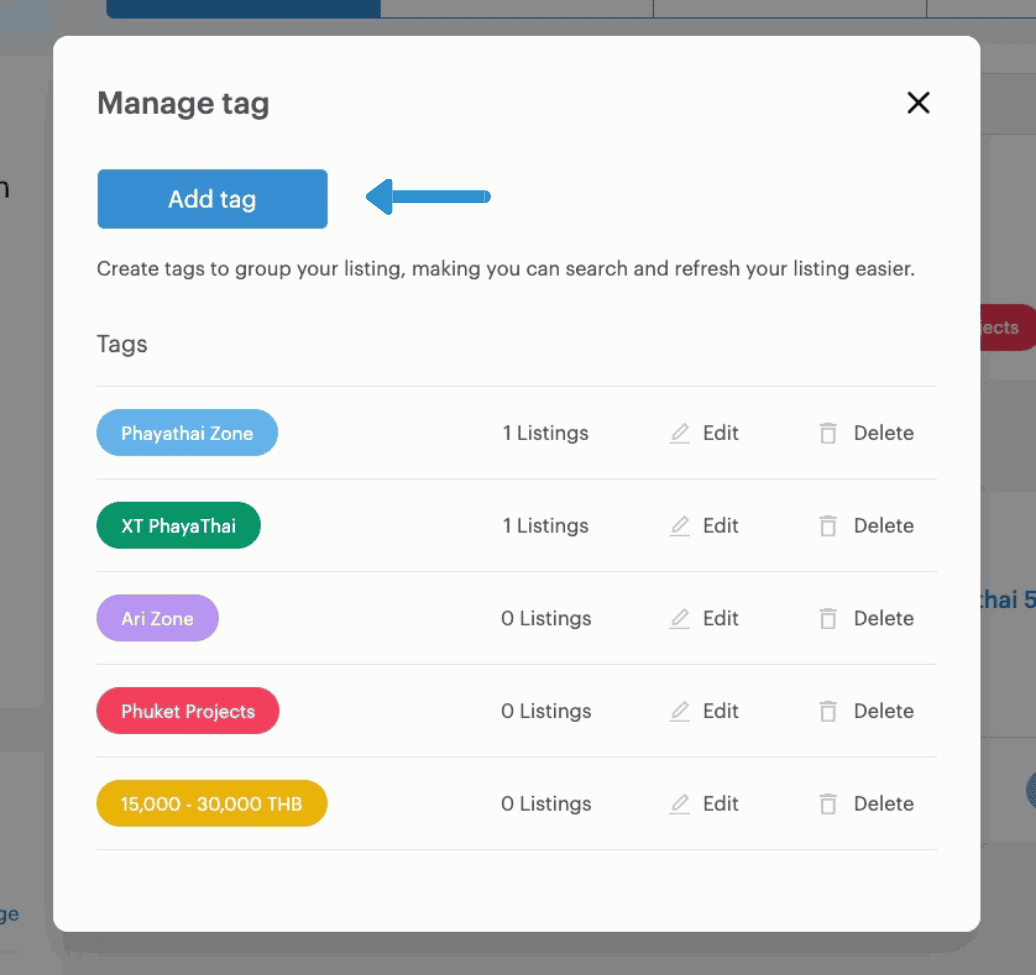
Before you begin tagging your listings, you must first create a set of tags. This can be done by clicking the “Create and Manage Tags” button located in:
Dashboard >> Listings Menu >> Create and Manage Tags
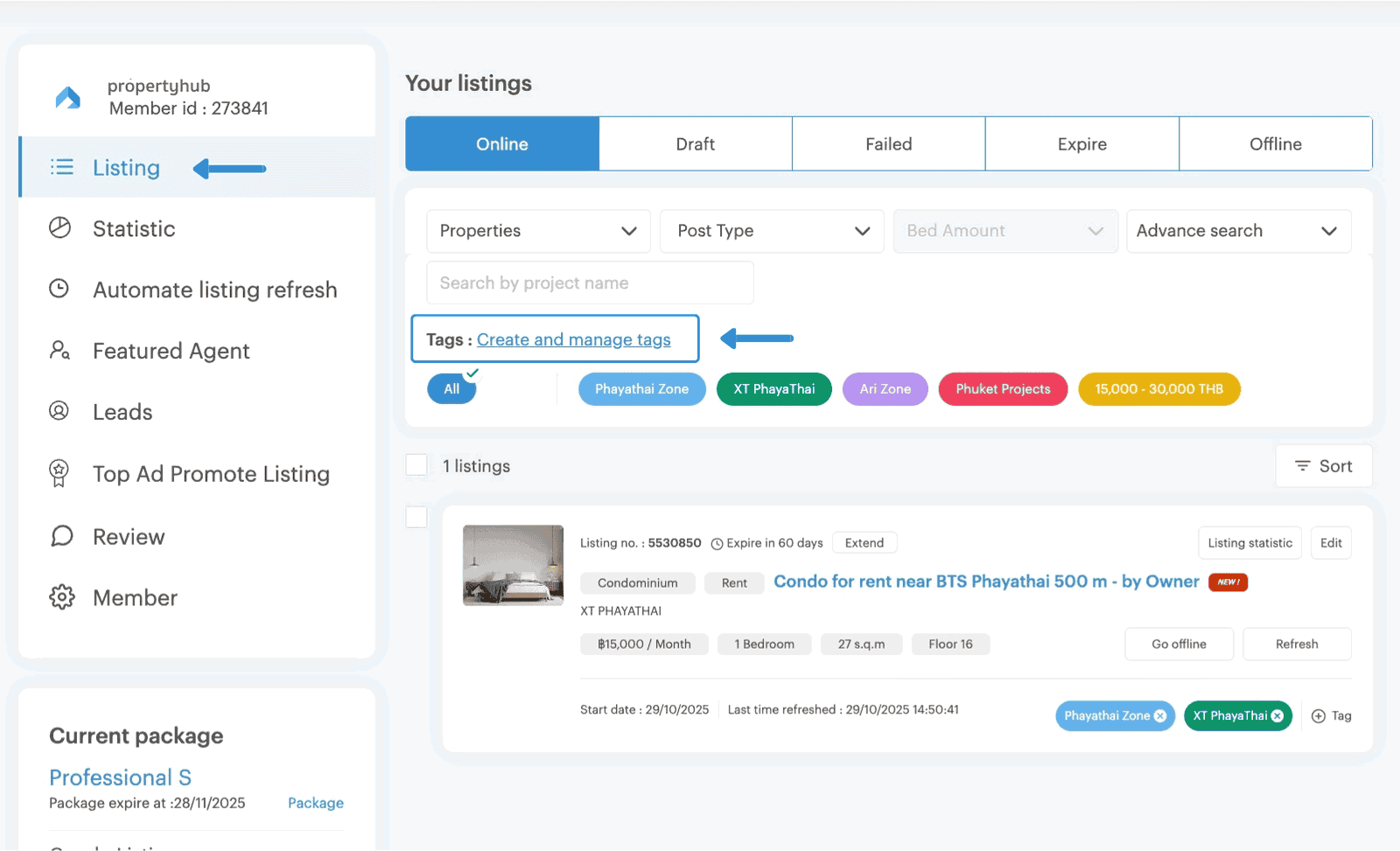
 

Step 1 for create tags on propertyhub


Once you click on “Create and Manage Tags,” a pop-up window will appear on your screen, allowing you to add and manage your tags (as shown in the image).
 

Step 2 for Create tags on propertyhub

step 3 for create tags on propertyhub


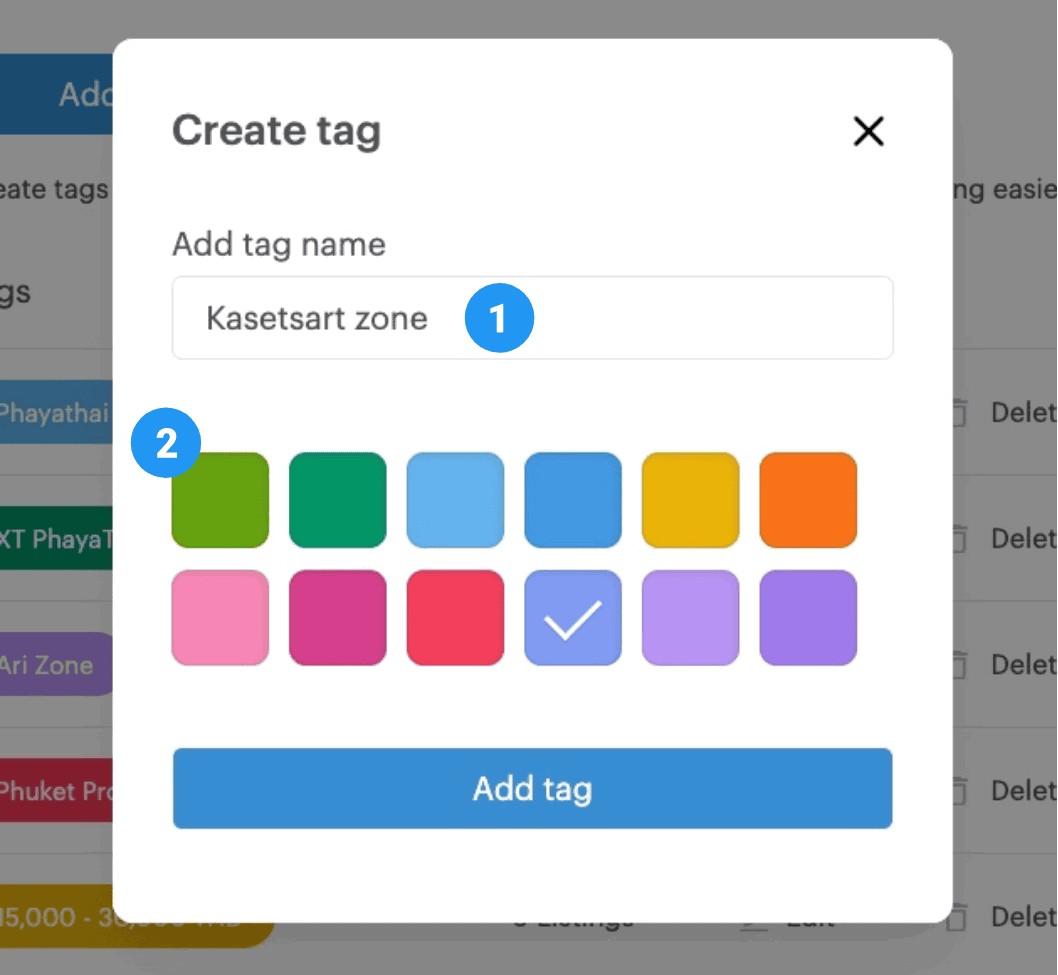
When creating a tag, you are required to specify two key details:

  1. Tag Name : It is recommended to use a clear and concise name that helps you easily identify your listings, such as Phaya Thai Zone Listings or 20,000 THB Listings.
  2. Tag Color: Choose a color to help differentiate between multiple tags and avoid confusion when managing numerous listings.

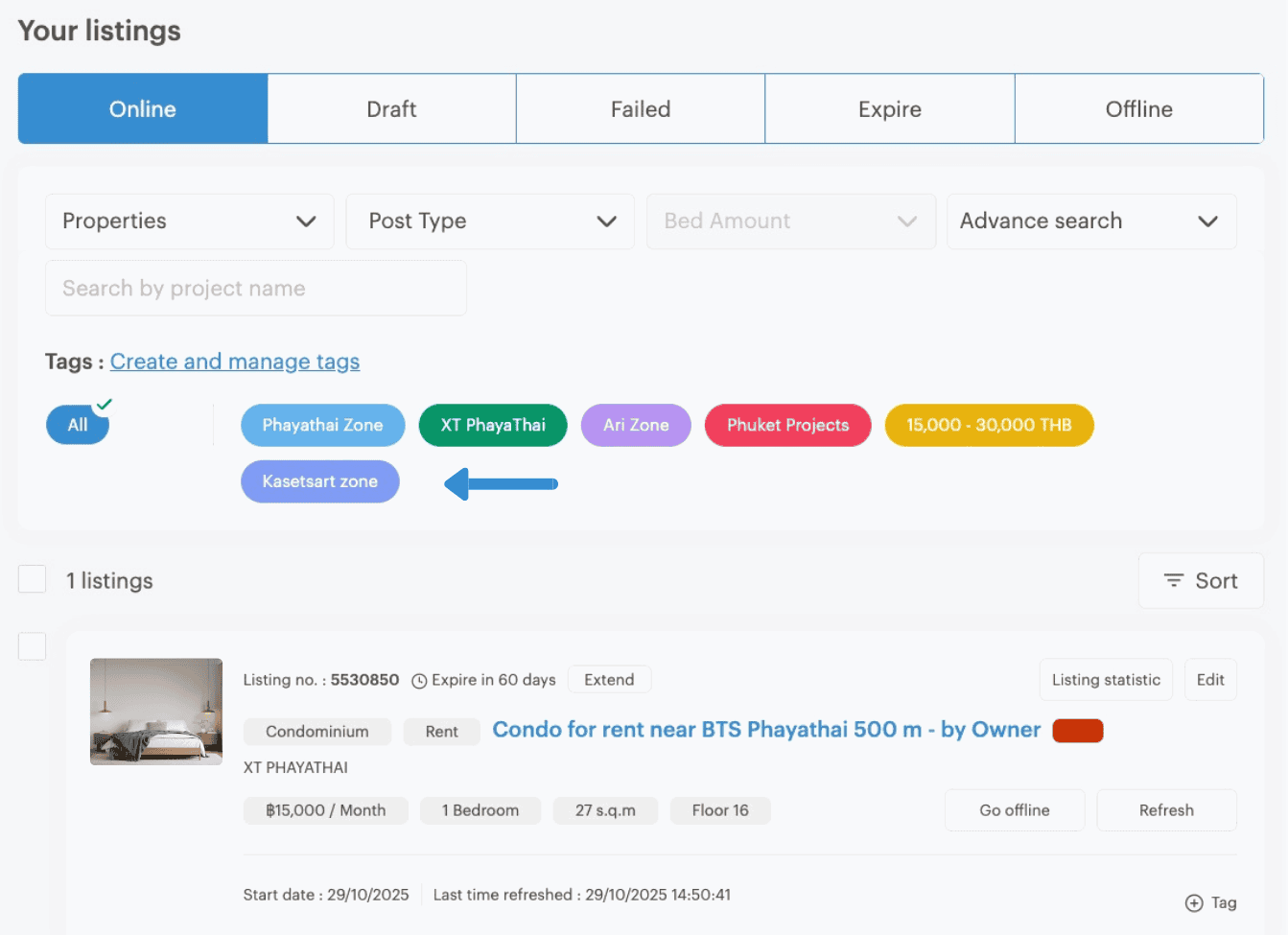
After creating your tags, all of them will be displayed and can be managed directly in Listings page.


Using Tags to Manage Your Listings

Return to the Listings Page, which contains all of your listings. Once you have created your tags following the previous steps, they will also appear here as examples (as shown in the reference image).
 

step 5 for create tags on propertyhub


Start Using the Tags

Let’s begin using the tags you’ve created — it’s simple and can be done in just a few steps below : 

1. Tags on Single Listing
step 6 for create tags on propertyhub

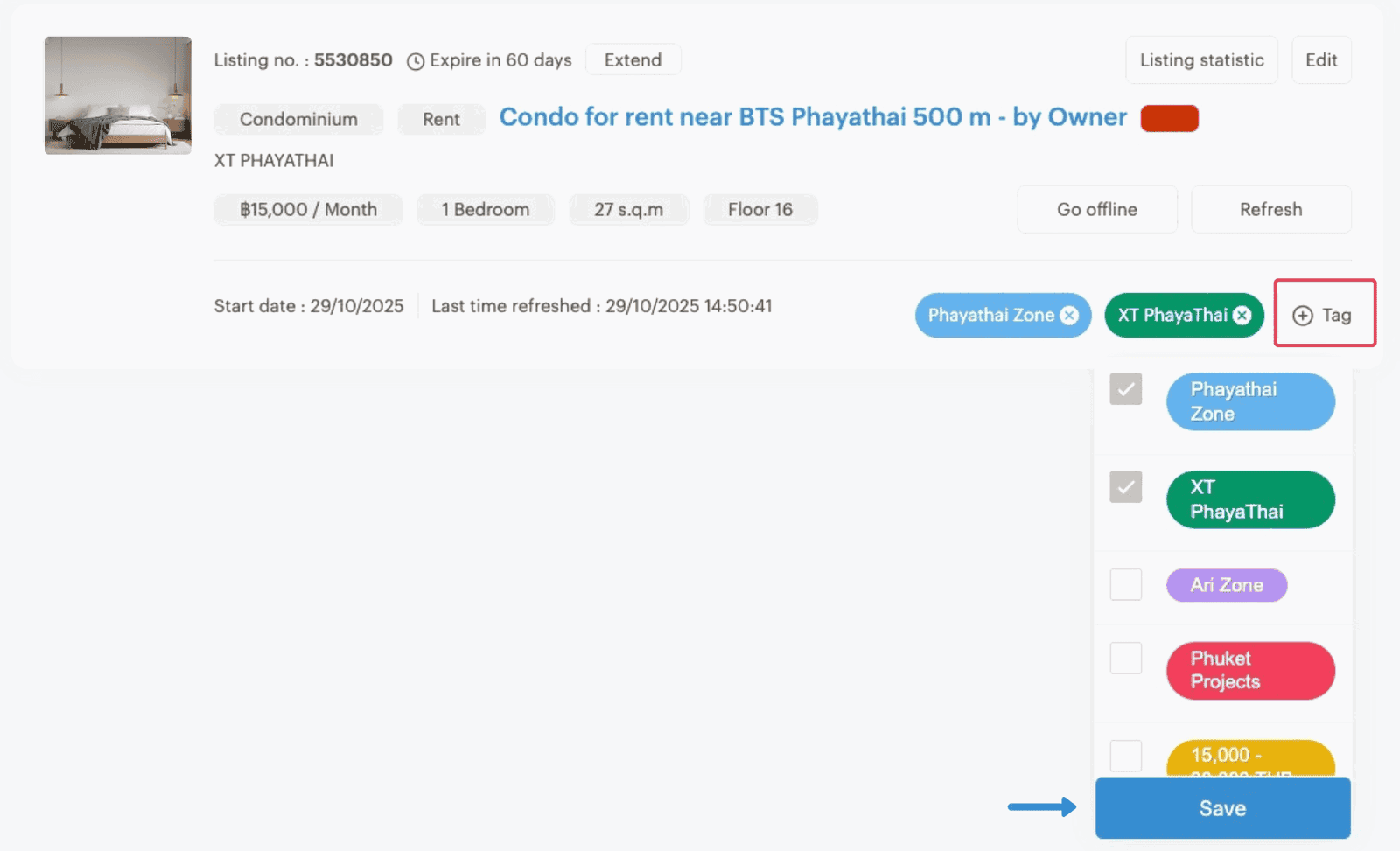
Each of your listings has a “+ Tag” button located on the right-hand side. When you click this button, your list of created tags will appear. Simply check the box in front of the desired tag(s) and click “Save” (You can select more than one tag per listing.)


2. Tags in Multiple Listings 

If you want to apply tags to several listings simultaneously, you’ll need to filter the listings on your listings page to display only the ones you want to tag. You can filter by project, rental/sales type, or room type, depending on how your listings are organized.
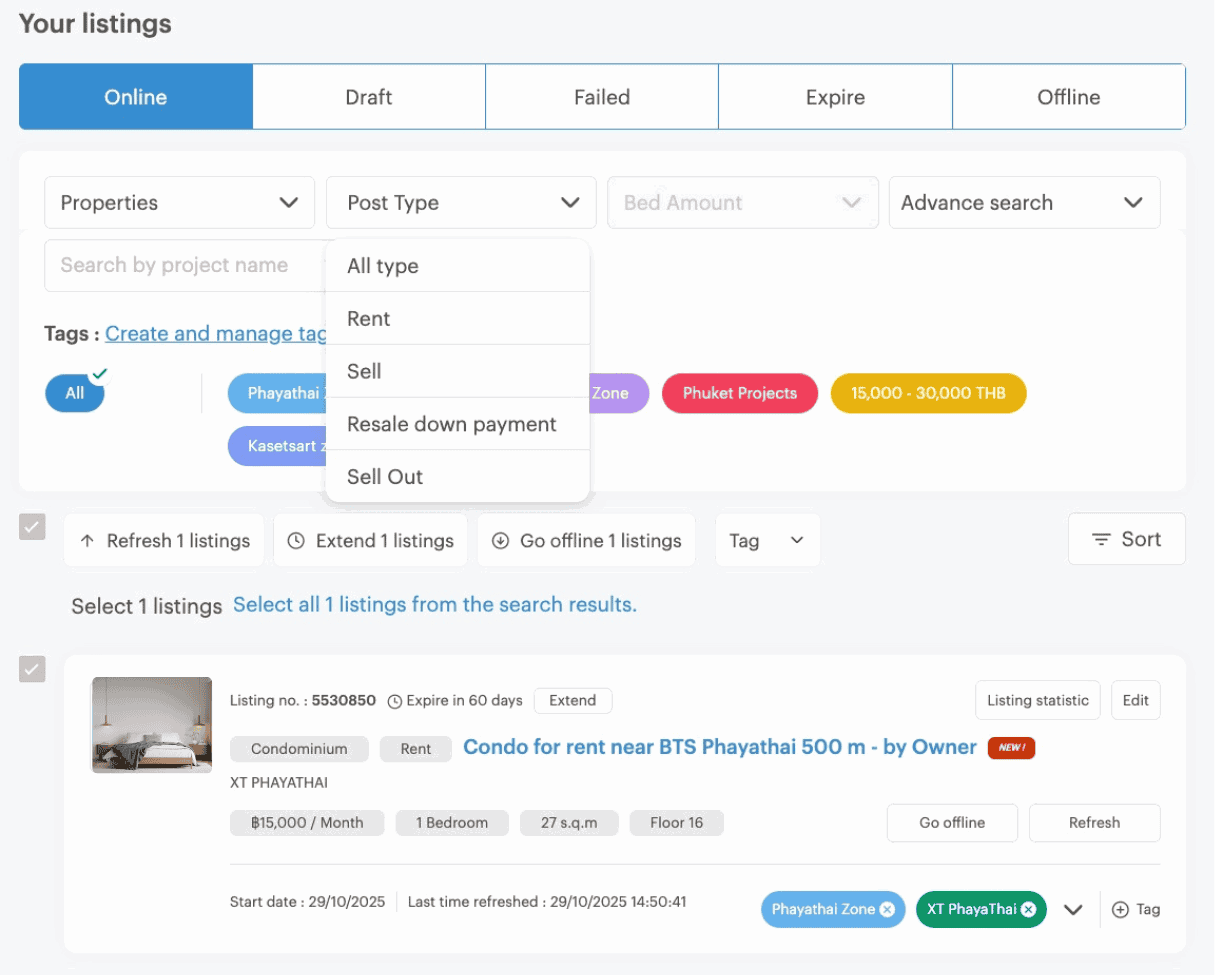
 

Last step create tags on propertyhub

*Note: Each page can display a maximum of 20 listings. If you wish to select more listings at once, tick the box labeled “Select all xxxx listings from the search results.”


These are the simple steps to use Tags for organizing your listings, helping you manage your PropertyHub account more efficiently. We hope this feature enhances your workflow, ensuring greater accuracy and convenience. If you encounter any issues or have further questions, please contact our team via Line ID: @propertyhub or call 02-026-3049.


User Guide propertyhub.in.th

User guide for propertyhub.png

แชร์เนื้อหา
Khao
ช่องทางในการติดตาม
LINE@ Add Friend
บทความที่เกี่ยวข้อง

Backlog คืออะไร ? คำควรรู้ก่อนเข้าสู่วงการอสังหาฯ

Backlog คืออะไร ? ทำความรู้จักคำศัพท์อสังหาริมทรัพย์ที่นักลงทุนควรรู้ เข้าใจความหมายของ Backlog และความสำคัญก่อนตัดสินใจซื้อบ้านหรือคอนโด

โพสต์เมื่อ27 January 2026

Freehold vs Leasehold คืออะไร ? นักลงทุนอสังหาฯ มือใหม่ควรรู้จัก

Freehold vs Leasehold คืออะไร ? ทำความเข้าใจความแตกต่างของการถือครองอสังหาริมทรัพย์ เหมาะกับนักลงทุนมือใหม่ วิเคราะห์ข้อดี–ข้อควรรู้ของ Freehold และ Leasehold ก่อนตัดสินใจลงทุน

โพสต์เมื่อ21 January 2026

สถิติผู้ใช้งานเว็บไซต์ Q4 2025 | propertyhub.in.th

สรุปข้อมูลสถิติการใช้งานเว็บไซต์ propertyhub ในช่วง ไตรมาสที่ 4 (ตุลาคม – ธันวาคม 2568) เพื่อให้เกิดประโยชน์ต่อกลุ่มผู้ใช้งานในวงการอสังหาริมทรัพย์ประเภทคอนโด โดยครอบคลุมทั้งกลุ่มผู้ที่กำลังมองหา คอนโดเพื่อเช่าหรือซื้อ รวมถึงนายหน้าที่ต้องการวิเคราะห์พฤติกรรมผู้ใช้งานและแนวโน้มความสนใจในตลาดอสังหาริมทรัพย์

โพสต์เมื่อ09 January 2026

Website User insights for Q4 2025 | propertyhub.in.th

Web users insight on propertyhub.in.th in Quarter 4, 2025 (October - December). This article aims for anyone in the condo market which include buyer, renter, investor, or agent who wants to better understand current user trends and interests in property market.

โพสต์เมื่อ09 January 2026

บทความแนะนำ

รวมขั้นตอนการรับโอนคอนโด พร้อมเอกสารการโอนที่ต้องจัดเตรียม

รวมขั้นตอนการรับโอนคอนโด พร้อมเอกสารการโอนที่ต้องจัดเตรียม

ในการซื้ออสังหาริมทรัพย์อย่างคอนโดนั้น นอกเหนือจากราคาขายคอนโดแล้ว สิ่งที่ต้องทราบนอกเหนือจากนี้ก็คือเรื่องของ ขั้นตอนต่างๆ ที่ผู้ซื้อทุกรายจะต้องทำความเข้าใจ เพราะไม่ว่าจะเป็นการ ซื้อคอนโด มือหนึ่งจากผู้พัฒนาโครงการ หรือการซื้อคอนโดมือสองต่อจากผู้เป็นเจ้าของก็ตาม ขั้นตอนของการ โอนคอนโด คือเรื่องที่จะสร้างความปวดหัวไม่น้อยสำหรับใครที่ไม่เคยทำความเข้าใจมาก่อน

โพสต์เมื่อ29 August 2025
วิธีเช็คแนวเวนคืนที่ดิน(เบื้องต้น) ก่อนตัดสินใจซื้ออสังหาฯ

วิธีเช็คแนวเวนคืนที่ดิน(เบื้องต้น) ก่อนตัดสินใจซื้ออสังหาฯ

ทางทีมงาน Propertyhub จะขอพาคุณไปรู้จักกับวิธีเช็คแนวเวนคืนที่ดิน(เบื้องต้น)ก่อนตัดสินใจซื้ออสังหาฯ ทั้งนี้ก็เพื่อป้องกันปัญหาการเวนคืนที่ดิน ที่ขอบอกได้เลยว่าไม่มีใครอยากจะเจอ

โพสต์เมื่อ08 September 2023

คอนโดให้เช่ายอดนิยม

propertyhub logo

เมนูหลัก

ติดต่อเรา

บริษัท ซิมเปิ้ล อินเทอร์เน็ต
จํากัด เลขที่ 242 ห้องเลขที่ A210 อาคาร A
ศูนย์การค้าเพลินนารี่มอลล์
ถนนวัชรพล แขวงท่าแร้ง เขตบางเขน
กรุงเทพมหานคร 10230
Line QrCode
Line ID : @propertyhub
โทร. 02-026-3049

support@propertyhub.in.th

Line QrCode
Line ID : @propertyhub
โทร. 02-026-3049

support@propertyhub.in.th

twitter icon
youtube icon
instagram icon
Copyright © 2019-2020 Zimple Internet Co., Ltd. , All rights reserved.
facebook icon
twitter icon
youtube icon
instagram icon